Cases

Case 01 / 03 · Product Designer and technical lead

VERSA OS

When the tool starts adapting to the company.

A proprietary project management system, built with Claude Code, for a corporate education company that was tired of bending its own process to the limits of ClickUp, Notion and Jira.

Versa produces corporate courses on a pipeline that runs through Projects, Content, Audiovisual, Creative and Post-production. Each team sees the same work at a different granularity, and no off-the-shelf tool could handle that without workarounds. VERSA OS models the company real pipeline: one card that travels through every team, automatic triggers between stages, time tracking per team and per client, and a continuous improvement loop in which an AI triages the suggestions of the team itself.

My role
Product Designer and technical lead
Tools
Claude Code, PHP + HTML, Google Drive
Status
final stage of development, in production in January 2027
01

Context

Every course goes through a pipeline with five fronts: Projects (client relationship), Content/Instructional Design, Audiovisual (shooting), Creative (assets) and Post-production (editing and finishing).

In a short time, the team went through Notion, ClickUp, back to Notion, plus trials with Jira. The migrations happened mid-operation, with clients and deadlines running. The turning point was realizing that the problem was not which tool to choose, but trying to fit the Versa process into a structure designed for another kind of company.
02

The problem

The problem was not missing features. It was their data model: everything became a task of the same size, and Versa does not work that way.

Tasks multiplied by hand

To shoot a 100-lesson course, Audiovisual had to schedule 100 tasks on the calendar, one per lesson.

Post-production in the dark

A shooting day becomes a logging card that groups, by hand, more than 20 lessons. Post once planned the logging of a day expecting a module that had not been shot that day.

Manual handoffs

When a script was done, someone from Projects had to go into the tool and release the editing. The Projects team became the secretary of the operation.

No history between stages

Whoever made an asset could not see what had happened in the script, and no team had data on how long work sat waiting on the client.

03

The insight: each team works at a different size

Versa work changes size as it moves along the pipeline. Content handles each lesson individually; Audiovisual and Creative can work with blocks of information; in Post-production, work goes back to one lesson at a time.

Off-the-shelf tools pick one granularity and impose it on everyone. VERSA OS keeps a single card that travels through every team, but each team sees it and distributes it at the size it actually works.

04

Build instead of buy

The decision to build was approved by leadership in September 2026, after an open presentation to the team. The market path had been tried more than once; what changed was the cost of building: with AI-assisted development, a custom system no longer required a dedicated engineering team.

Full customization

Rules, flows and cadences configurable inside the system, with no programmer needed for every change.

Less friction between teams

The card moves through every area the way the work really does.

Lower operating cost

No more recurring licenses or migrations mid-operation.

Own data

Client time, queue time and execution time measured from day one.

05

How the card moves through the pipeline

VERSA OS replaces manual handoffs with triggers: when a stage ends, the next one is released on its own. A client approval releases Shooting and Assets at the same time; a rejection goes back to the script and counts as a new version.

Light project setup

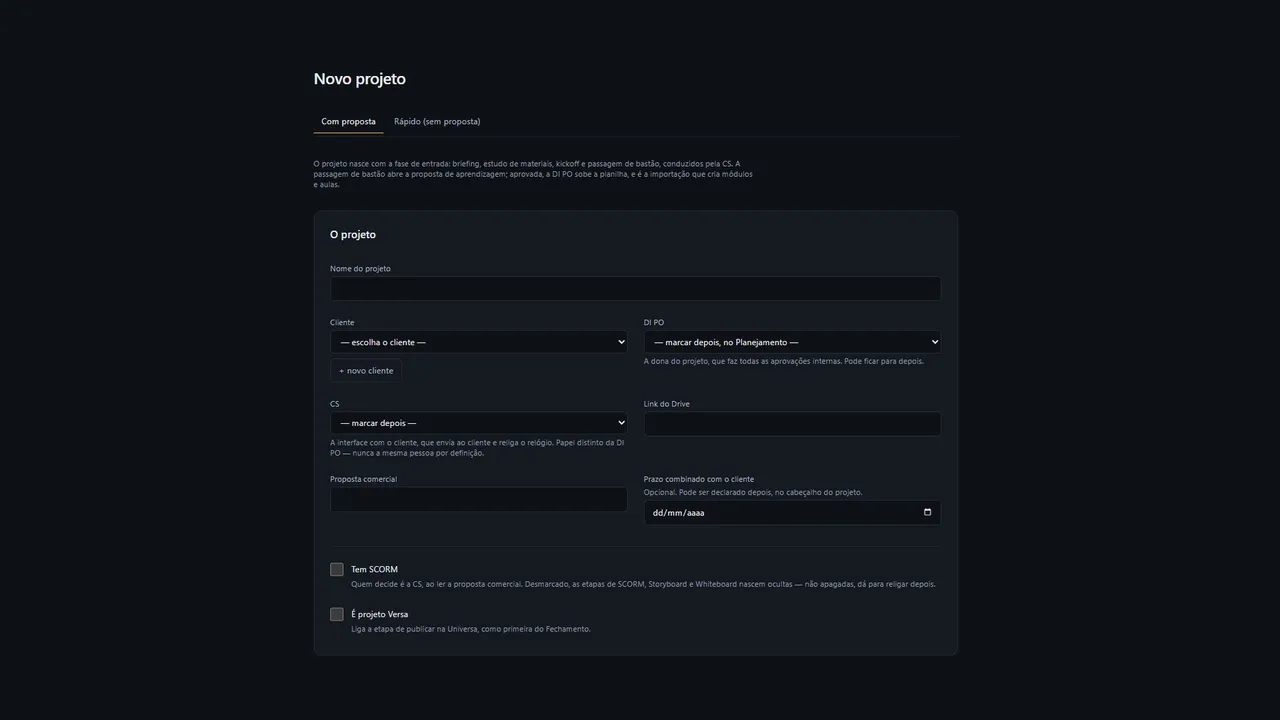
Projects creates the project with a few fields; the project type changes the path it takes through the system.

Queue before calendar

Requests only become available when the material is ready. Anyone can take a task, or leadership can assign it.

Tasks generated in seconds

The instructional designer imports the learning proposal spreadsheet, and the system creates the tasks for every team at once.

Three clocks

The system tracks client time, queue time and execution time for each team separately. Client delays are no longer silently absorbed by the operation.

Panic button and single history

A critical priority reorders the queue and notifies everyone involved. Whoever picks up the card at any stage sees everything that happened before.

06

A system that evolves with use

During testing, anyone can leave a suggestion at the exact spot in the interface where they felt friction: a pencil appears on hover, and the suggestion stays attached to the button or screen where it was born. An AI classifies the suggestions and recommends what should go into the next sprints; the responsible team decides and implements.

07

Built with Claude Code

VERSA OS was written 100% with Claude Code, by a team with no dedicated engineering. The human role was deciding what to build and why; the AI wrote the code. Scripts, videos and sensitive data stay on Google Drive: the system only organizes, shows and embeds them.

Building with AI does not replace product work. Without a clear model of how work flows, AI only speeds up building the wrong tool.

08

Learnings

The presentation to the team showed what discovery had missed. Nothing was rebuilt, but much of the system changed shape: importing the proposal became optional, a button to add a deliverable mid-project appeared, a client page started releasing material only after internal approval, and the delay alerts were revised after scaring people who opened the alpha.

The biggest learning: the right question was not "which tool to use", but "what is the unit of work of each team".

09

Status

Final stage of development, in parallel testing with representatives of each team; fully in production in January 2027. There are no result numbers yet. Measurement is already built in: time with the client, queue and execution time per team, internal adjustments vs. client versions and capacity per island.

Client and people names are blurred in the screens.

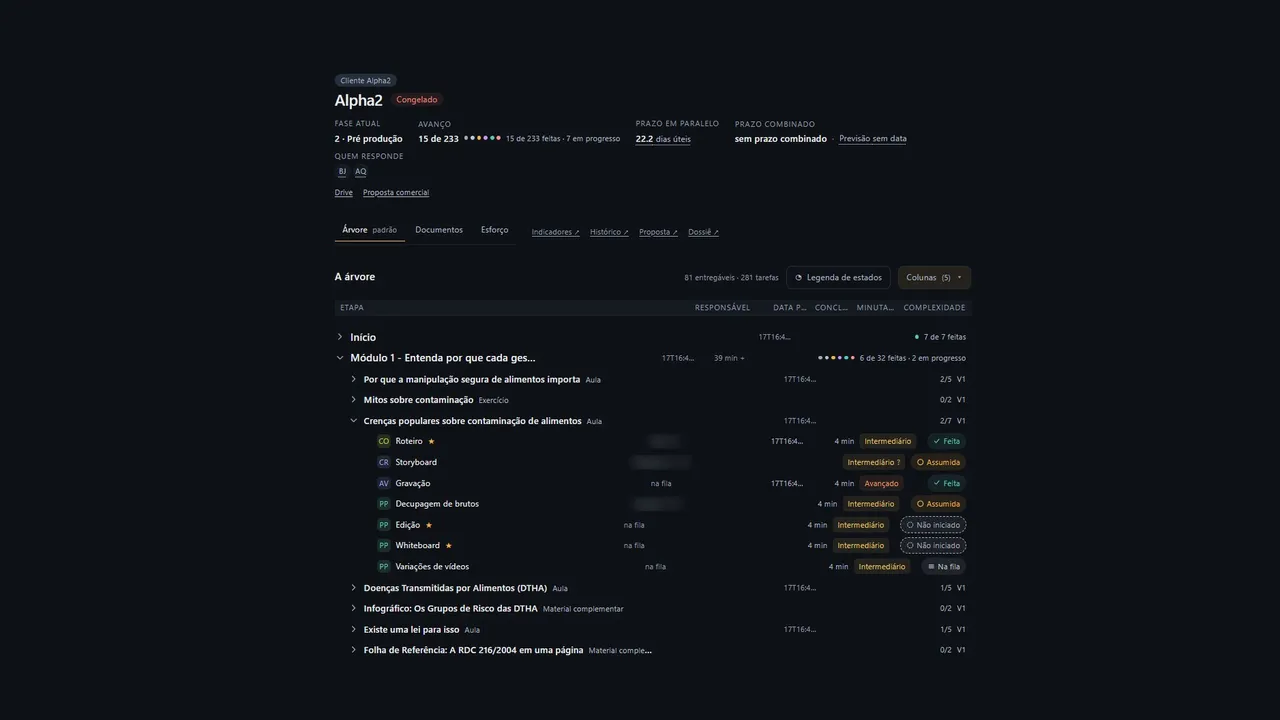
VERSA OS · screens

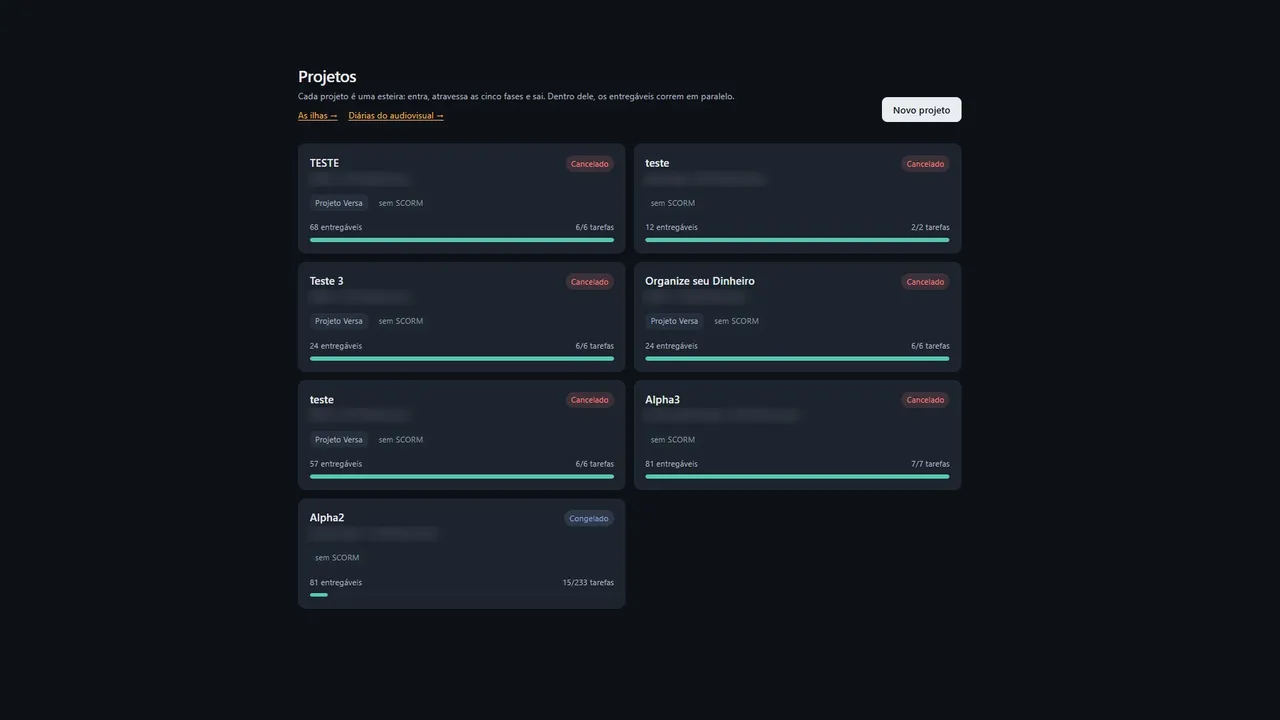
Projects: each project is a pipeline that runs through the five phases.
01Projects: each project is a pipeline that runs through the five phases.
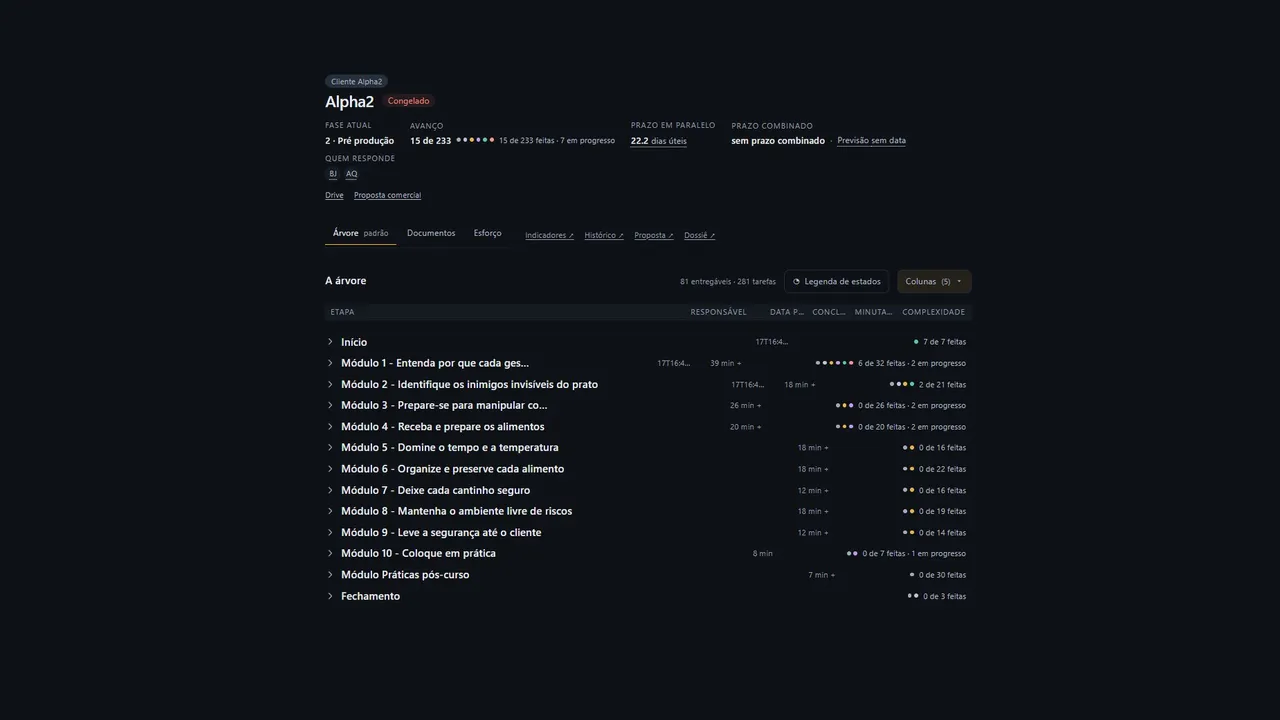
The project tree: modules, deliverables and tasks.
02The project tree: modules, deliverables and tasks.
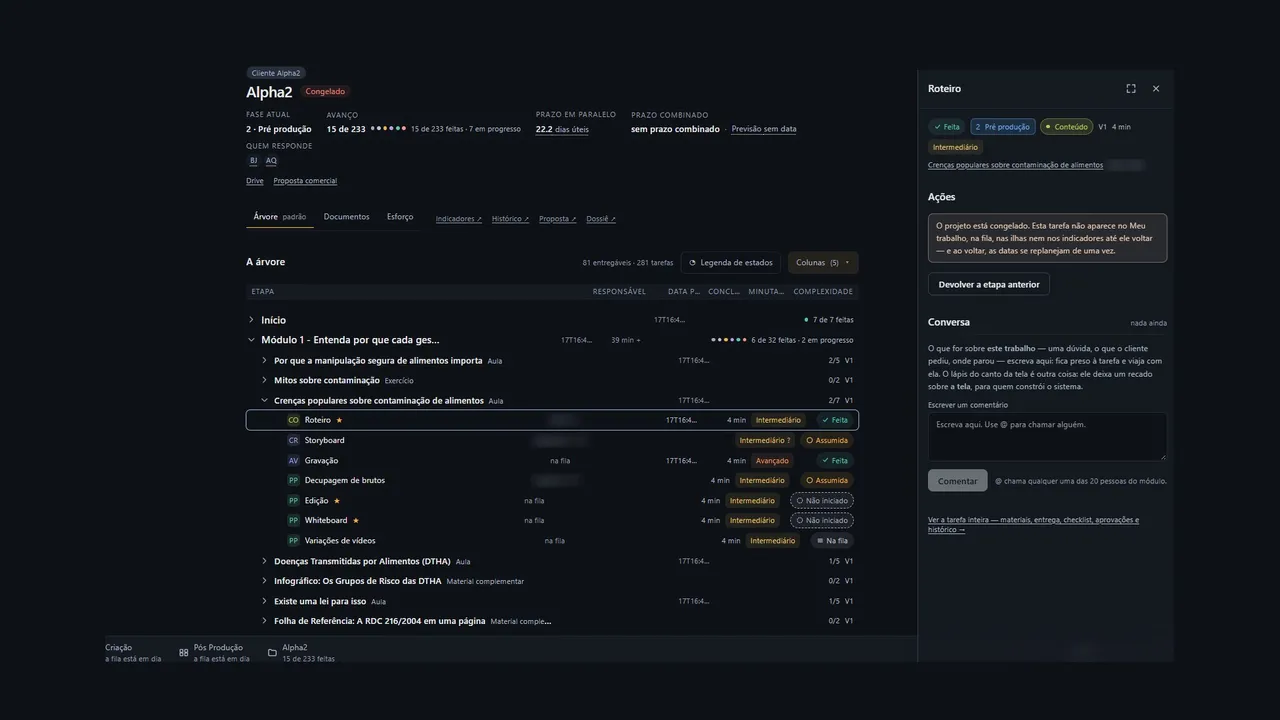
A lesson opened: each team task, with complexity and status.
03A lesson opened: each team task, with complexity and status.
The task panel: actions and the conversation that travels with the card.
04The task panel: actions and the conversation that travels with the card.
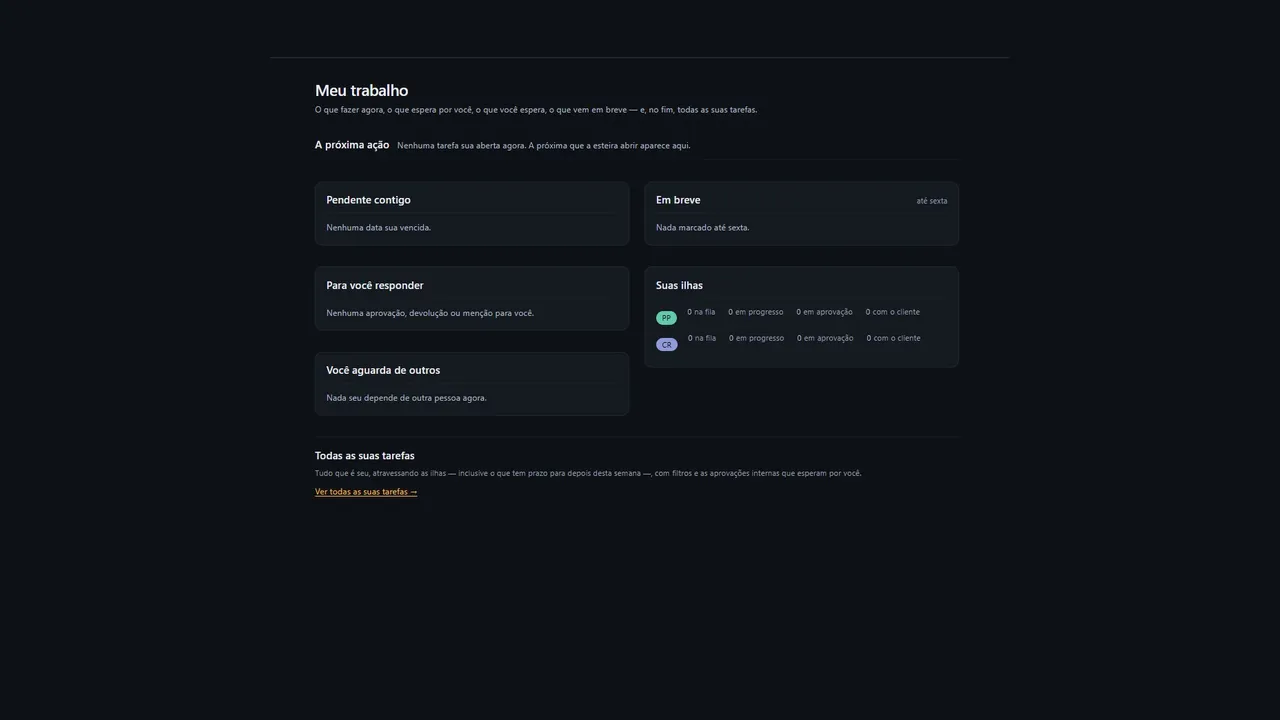
My work: the next action, what waits for you and what you wait for.
05My work: the next action, what waits for you and what you wait for.
New project: setup in a few fields.
06New project: setup in a few fields.
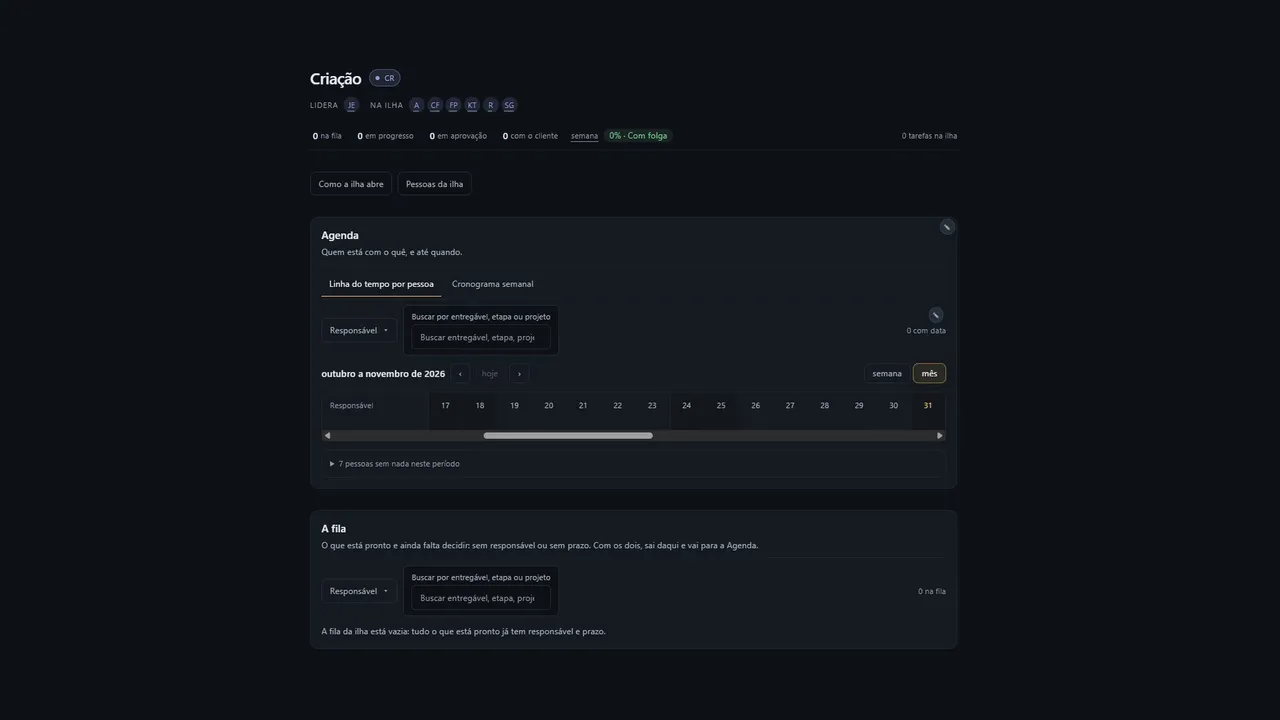
Creative island: schedule per person and the queue of what is left to decide.
07Creative island: schedule per person and the queue of what is left to decide.
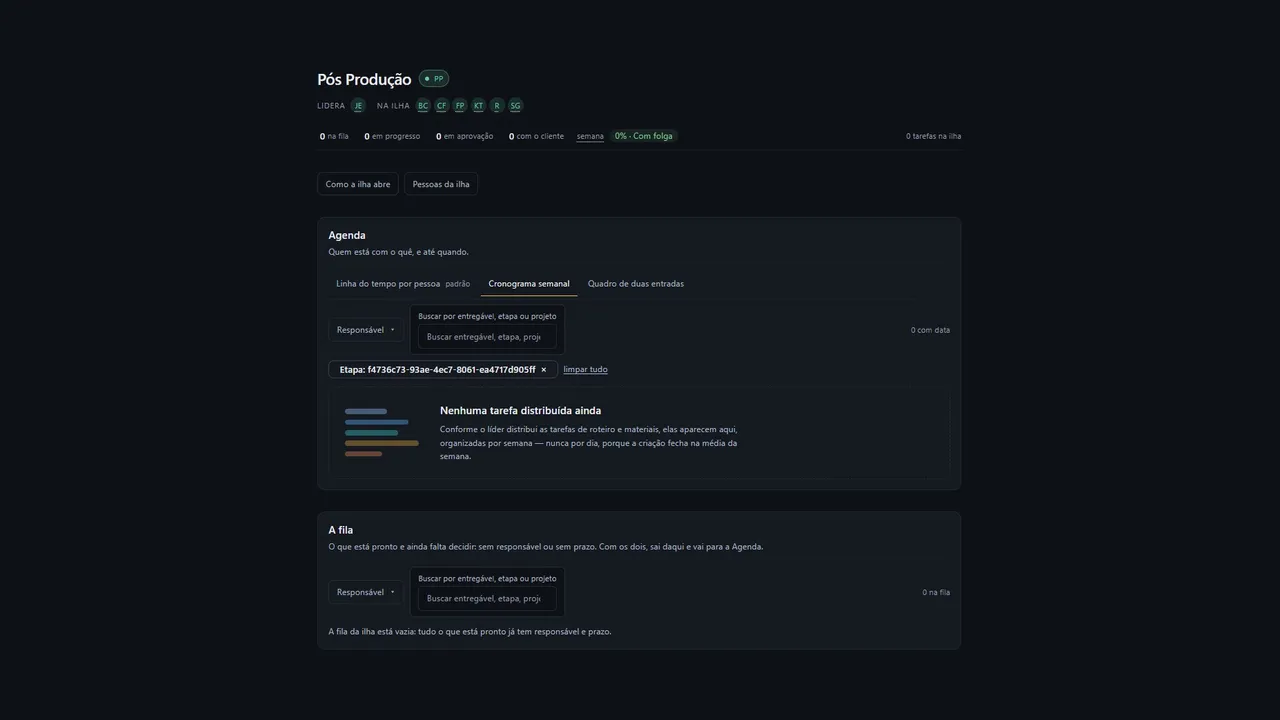
Post-production island: weekly schedule.
08Post-production island: weekly schedule.
Case 02 / 03 · Product Designer

CRIVO

Review and approval of educational videos.

Crivo is a review and approval tool for educational videos in which the client classifies each comment while reviewing. It was born from a pain I live as post-production coordinator at Versa Educação: feedback arrives as free text, someone has to translate it, and the editor still has to interpret it before touching the video.

My role
Product Designer (discovery, UX, UI, design system and prototype)
Format
a few-hour sprint, from discovery to clickable prototype
Status
clickable prototype ready; usability test and working V1 planned
See the prototype ↗
01

Overview

My role

Product Designer: discovery, UX, UI, design system and prototype. I also lead the team that would use the product.

Product

B2B, corporate education, four profiles: project manager, makers, coordination and client.

Methods and tools

CSD matrix, analysis of real feedback, flow mapping, wireframes, design system, Claude and Lovable.

Baseline

2.4 versions per delivery and an 8-day lead time on 1-hour video projects.

02

Problem and solution

Problem: review feedback arrives unstructured and goes through a manual translation between email and Notion. That creates extra versions, hides new requests inside adjustments and lets approvals block other stages without anyone seeing it.

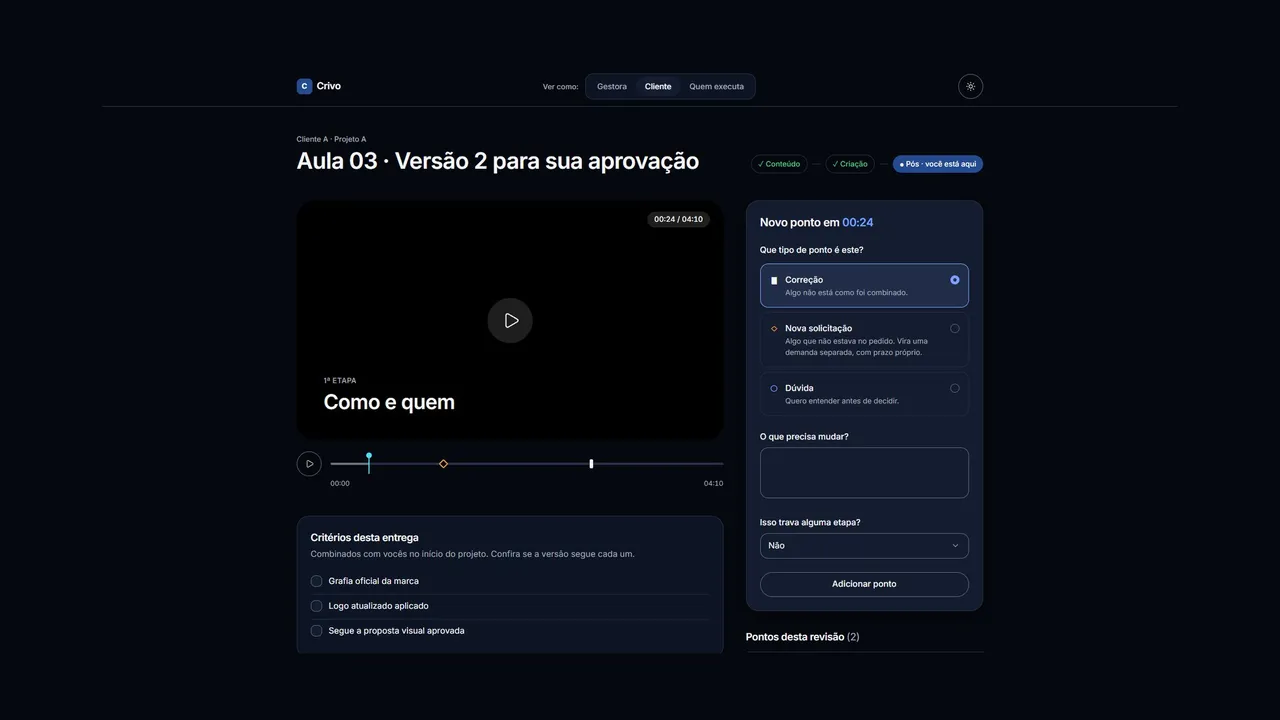
Solution: the client reviews directly in the product and marks each point as a correction, a new request or a question, with a timecode and saying whether it blocks a stage. The system splits the paths on its own.

03

Context

Versa produces corporate education courses, and every client comes with its own brand, language and criteria. I coordinate post-production, a team of 9 people across editing, motion and design, and more than one area takes part in each delivery: Content writes the script, Creative defines the visual proposal and Post assembles the videos.

Over the last year, I standardized processes that ran disconnected. The lead time of a 1-hour project dropped from about 14 to 8 days, and versions per delivery dropped from 4 to 2.4. Still, 2.4 versions is a lot of back and forth, and review was the part of the flow I had not yet tackled head on.

Client and people names are anonymized in this case.

04

CSD matrix

I started by separating what I knew from what I thought I knew. I narrowed the scope early: instead of the whole production management, only review and approval, because that is where lead time gets stuck. One of my assumptions fell early on: I thought the comments lacked timecodes.

Certainties

• Waiting for approval, internal or from the client, weighs more on lead time than editing.
• There are still 2.4 versions per delivery on average.
• Feedback arrives poorly structured.
• Tasks and projects live in Notion.
• Each client reviews with its own brand and language criteria.

Assumptions

• Poorly structured feedback is the main cause of extra versions.
• Some versions come from scope changing mid-review, not from errors.
• The approver does not clearly know what to decide, nor by when.
• A quality gate before sending to the client would cut rounds.

Questions

• What does "poorly structured" mean in practice?
• How many approval layers exist, and who is in each one?
• Why do extra rounds happen?
• How does the approver receive the version, and where do they answer?

05

Discovery

The problem was not missing timecodes: it was feedback having no shape, and a single person bridging the client and the team. I got there through three paths.

Real feedback, as it arrived

A loose comment mixed a priority request, new scope, two projects and a vague deadline, and the approval was blocking a shoot the following week. A criteria notice listed spelling, logos and visual proposal as links to folders: checking depended on the editor memory. A list of timecoded adjustments described in four items the symptoms of a single cause. None of the cases was the client personal taste.

The map of approval layers

A delivery goes through up to five approvals, in two systems: internal review happens in Notion, and the client review by email and Google Docs. There is no place to see the full history of a delivery.

Who bridges the gap

All client feedback arrives by email and is transcribed into Notion by a project and account manager. It is in that translation that structure gets lost and the new request comes in disguised as an adjustment.

06

Three insights

Four profiles touch the same delivery, each with a different pain. The project manager is the first user: she suffers the most from the problem and is where it takes shape.

Feedback has no shape

Correction, new request, priority and deadline arrive mixed in free text, and the structure depends on who writes it.

All translation goes through one person

If the manager is overloaded or away, the flow stops.

Dependencies between stages are invisible

A late approval blocks the shoot or the next stage, but that only shows up as "priority" in a comment.

07

Definition and MVP scope

How might we get feedback to the makers already split by type, with the client criteria at hand and with what blocks what visible to everyone?

In the MVP

• Review hub per delivery, with versions and approvals of the three areas in one place.
• Structured feedback: type, timecode, text and whether it blocks a stage.
• A new request automatically becomes a separate demand.
• Client criteria as a checklist attached to the version.
• Dashboard with status and dependencies between Content, Creative and Post.

Out of scope for now

Email notifications, Notion integration, video upload and login.

Success metrics

• Versions per delivery (baseline 2.4).
• Lead time of a 1-hour project (baseline 8 days).
• Time stuck waiting for approval (to be measured in the pilot).
• Points marked as new request (new indicator).

08

The hardest decision: does the client come into the product?

With the client outside, the manager would keep receiving feedback by email and log it in the structured format. It would be easier to adopt, because changing client habits is the hardest part. With the client inside, they review through a link and leave the feedback already classified, which removes the manual translation.

I chose the client inside. Manual translation is the root of the three insights, and keeping it would only make the problem more organized. To reduce adoption risk, the client comes in through a link, with no account, and each point type comes with a short sentence explaining what it means.

09

Design decisions

Classification at the source

The client picks the type of each point. It is the direct answer to the insight that feedback has no shape.

New request with its consequence explained

The option says "becomes a separate demand, with its own deadline". It nudges the client behavior without a written policy.

"Does this block any stage?"

One question in the form makes visible the dependency that used to exist only in text.

Criteria next to the video and quality gate

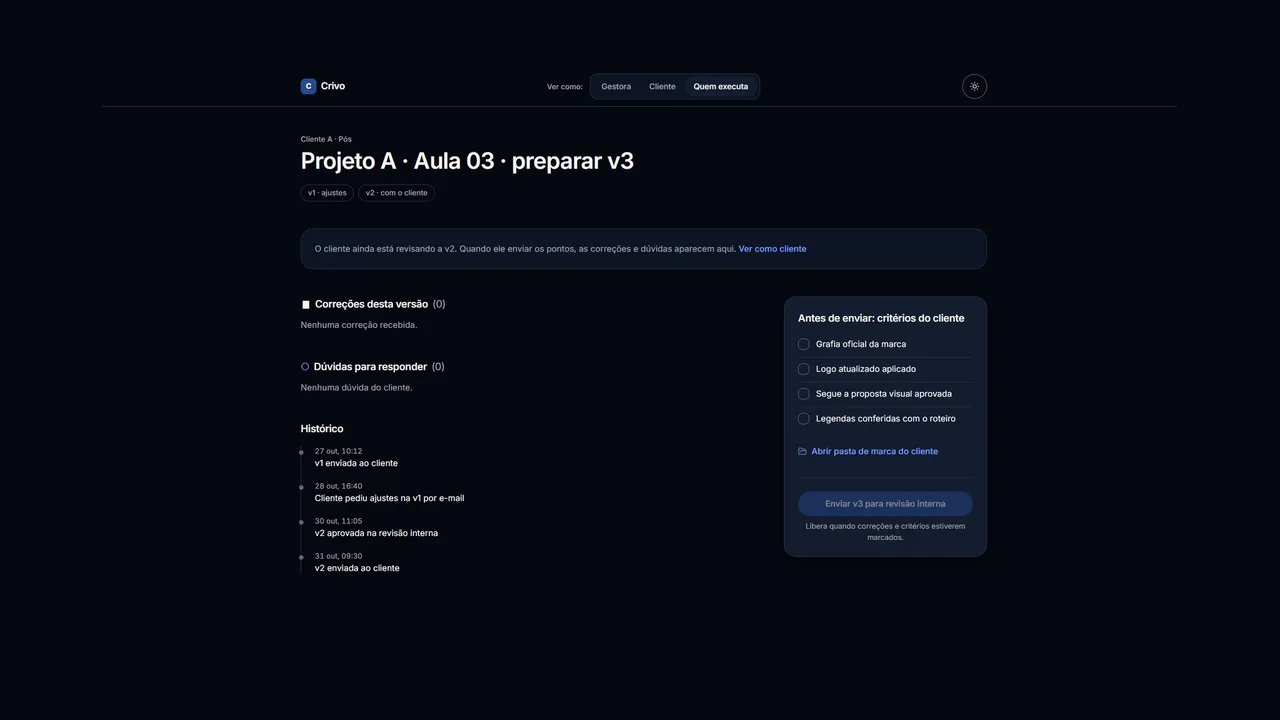
Spelling, logo and visual proposal leave the folders and sit at the moment of review. Sending the next version only unlocks with every correction and criterion checked.

Shape along with color

Each type has its own symbol (▮ correction, ◇ new request, ○ question), so it also works for people who cannot tell colors apart.

10

Design system

On a screen full of versions, deadlines and comments, the interface has to disappear so the decision can show. That is why Crivo has a minimalist language: black and white as the base, plenty of breathing room, generous corners and a single brand color (navy), with state colors for new request, approved and blocked.

Typography and shape

A single family, Inter, with tabular figures in timecodes. Radii that grow with the element and every button as a pill, at least 44 px tall.

Accessibility

Contrast of every text combination checked in both themes, all above 4.5:1. Cyan does not pass as text, so it is limited to graphic use.

Cover

A navy slab perforated by a grid of holes. Crivo means sieve, and the visual pattern comes from the product concept itself.

Crivo · prototype

Client: each point classified as correction, new request or question, with timecode and whether it blocks a stage.
01Client: each point classified as correction, new request or question, with timecode and whether it blocks a stage.
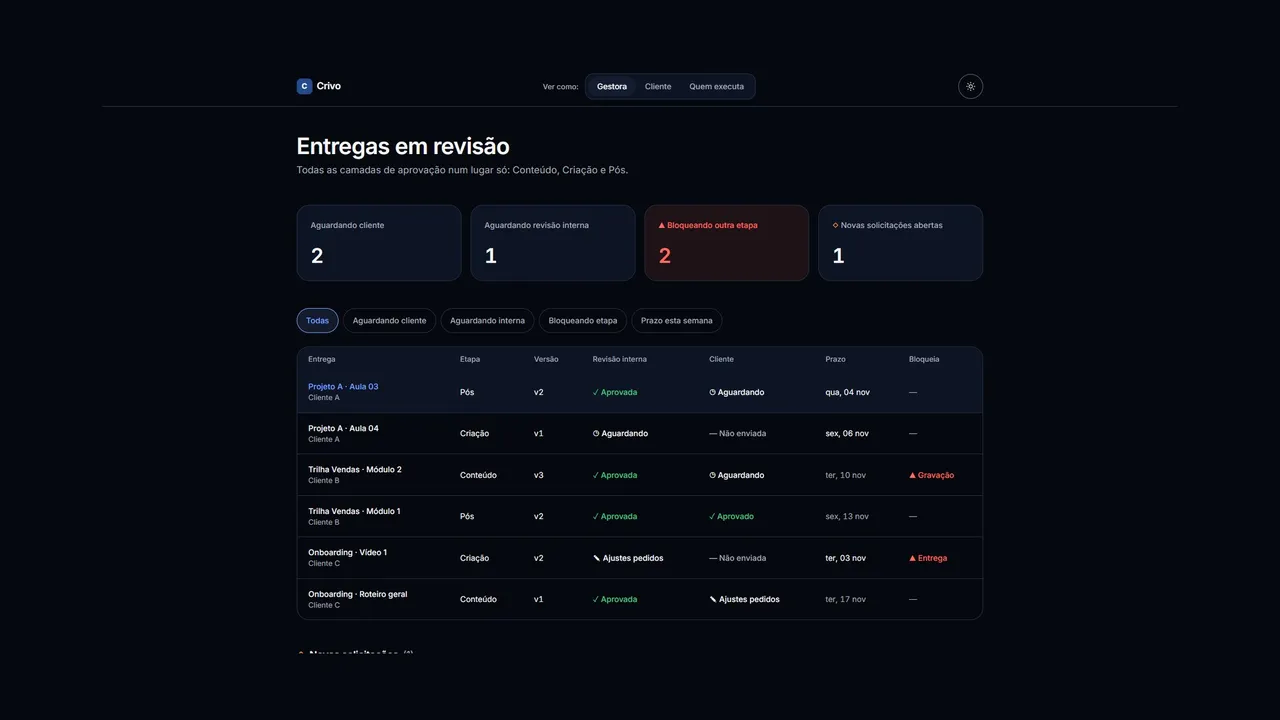
Manager: every approval layer in one place.
02Manager: every approval layer in one place.
Maker: corrections, questions and the client criteria before sending.
03Maker: corrections, questions and the client criteria before sending.
Case 03 / 03

HUB3

Hub3 · screens